
A payment soundbox makes a simple promise: a shopkeeper should be able to hear a useful payment alert while serving customers. In Pakistan, merchants can now approach that need in different ways. Some payment providers offer dedicated soundbox equipment. Other shops prefer to use a phone they already keep at the counter.
Quick answer: A hardware payment soundbox is a separate device, often connected to a specific acceptance network. A phone-based payment soundbox app such as SunoPaisa uses supported notifications already reaching a compatible Android phone. Neither option is automatically better for every shop.
What is a physical payment soundbox?
A dedicated soundbox usually sits at the counter and produces audible alerts for payments supported by its provider and account setup. Its appeal is straightforward: staff know exactly which device to listen to, and it may be linked to a provider's QR or merchant acceptance service.
Before buying one, ask whether it works with your bank or wallet account, what the device and service cost, how refunds or faulty devices are handled, and what happens when mobile connectivity is interrupted.
What is a mobile payment soundbox app?
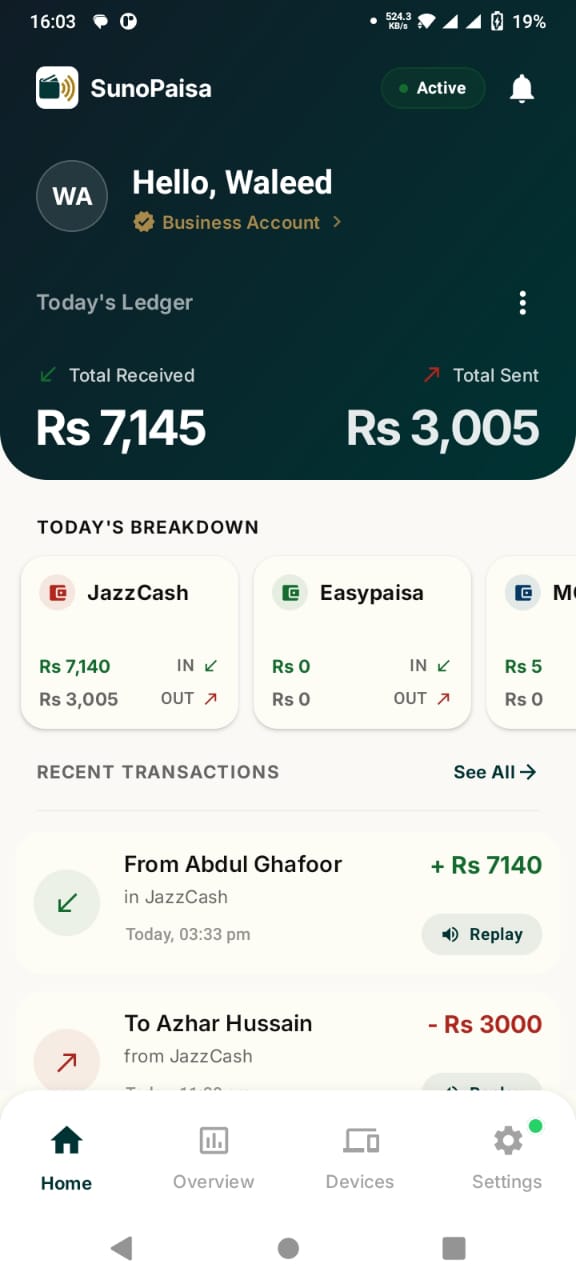
A phone app adds the voice-announcement experience to an existing Android device. With SunoPaisa, the shopkeeper selects compatible wallet and bank notification sources and grants Android notification access. When supported incoming payment information reaches the phone, the app can announce it.
SunoPaisa also includes a daily Hisaab and voice configuration. The free option starts with 50 monthly spoken alerts, so the owner can try the workflow without buying a separate box.
Phone app versus soundbox: side-by-side
- Hardware: Separate counter device — Compatible Android phone
- Payment source: Depends on provider and merchant account — Supported notification formats from selected wallets/banks
- Setup: Provider/device onboarding — App sign-in, permissions, wallet selection
- Voice delivery: Provider-specific device alerts — Recognized Android payment notifications
- Additional daily Hisaab: Depends on product — Included for recognized activity
- Starting cost: Varies by vendor and plan — 50 free spoken alerts monthly
- Verification: Follow provider's official records — Check official bank/wallet transaction record
This is a product-model comparison, not a claim that any specific hardware brand is inaccurate or overpriced. Ask vendors for current terms rather than relying on generic internet price lists.
Which is easier for a small shop?
A shop with an Android phone that already receives compatible bank and wallet notifications might find SunoPaisa simpler to try. A shop with only one QR acquiring provider and a bundled soundbox offer may prefer that device.
The decision becomes clearer if you ask four questions: Where do customers pay? Does that service send a supported notification? Which phone stays at the counter? Who needs to hear the voice during busy hours?
What about multiple wallets and banks?
A small merchant may accept JazzCash, Easypaisa and bank transfers. A single-provider hardware soundbox may only speak for the transactions linked to its own payment network. SunoPaisa is designed for a selection of supported Android notification formats across payment sources. That breadth is useful only if the actual notifications delivered by those providers are compatible.
See JazzCash voice-alert setup and Easypaisa notification setup for real examples.
What about daily Hisaab?
At the end of the day, a merchant wants to remember which transactions occurred and compare the record with official payment accounts. SunoPaisa groups recognized activity into a daily Hisaab view to make that review easier.
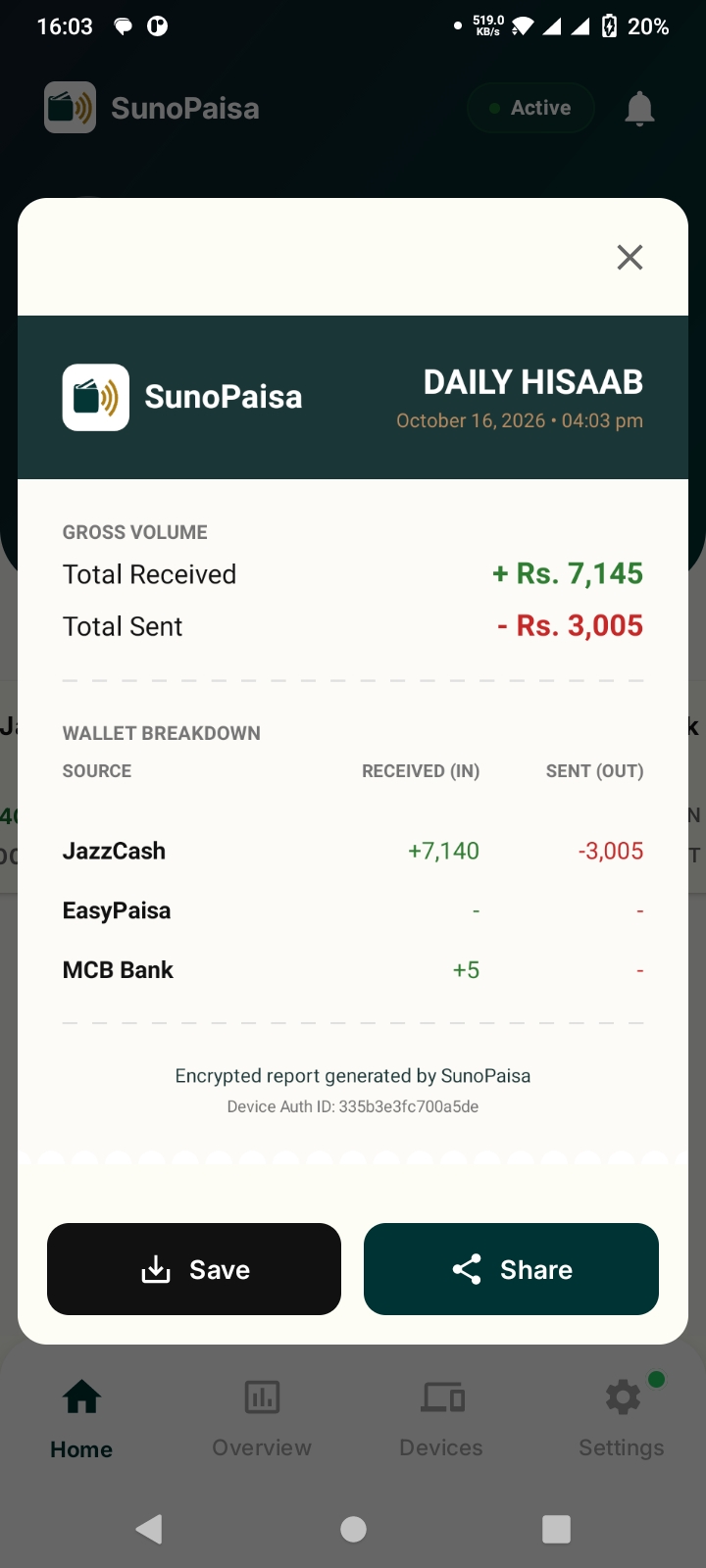
A daily notification log is helpful for organizing the shift, but official provider records remain necessary for reconciling settlement.
Can you get started for free?
Yes. SunoPaisa includes 50 free spoken alerts per month, followed by optional Business Mode for unlimited supported announcements and extra merchant features. Current website prices are on the Business Mode page. A standalone soundbox may have its own one-time, rental, network or service conditions: check the specific provider.
Frequently asked questions
Is a payment soundbox app the same as a physical soundbox?
They address a similar problem through different technologies. A mobile app reads supported Android notifications, whereas a hardware device is usually associated with a payment acceptance provider.
Is SunoPaisa better than all hardware soundboxes?
Not for every merchant. It is an attractive phone-based option where compatible notifications are available and the shop already has a suitable Android device.
Does SunoPaisa need a bank partnership to speak notifications?
Its stated feature is announcing supported notifications on Android; it does not claim an official partnership or independent bank settlement verification.
Can a shop use JazzCash and Easypaisa with it?
Yes, where the incoming notifications match supported formats and sources are enabled.
Is it free to try?
Yes, with 50 voice alerts each month. See current Business Mode pricing for higher-volume use.
Does it work with QR payments?
It can announce supported payment notifications related to QR transactions when the receiving wallet or bank sends a recognized alert. It does not itself issue or settle QR payments.
Should I trust the voice instead of checking the wallet?
A voice is helpful at the counter but is not final settlement evidence. Verify important payments through the official provider.
Compare the options at your own counter
If a customer already pays your JazzCash, Easypaisa or supported bank account, try SunoPaisa free from Google Play. View the real Android setup screens and compare Business Mode options only if the workflow proves useful.