
At a grocery shop, a customer shows an Easypaisa payment screen. The counter is busy, and the merchant would rather hear a useful notification than unlock the phone again. That is why people search for “Easypaisa payment bolnay wali app,” “Easypaisa voice notification” and “Easypaisa soundbox on mobile.”
Quick answer: SunoPaisa can speak incoming Easypaisa payment details when a compatible Easypaisa notification reaches the selected Android phone. You can install it free, enable Notification Access, select your supported payment source and test the real notification at the counter.
What does an Easypaisa voice alert tell you?
Imagine receiving a notification for a payment of Rs. 800. If the app recognizes that message as a supported incoming-payment notification, it may read the amount aloud. The point is not to introduce another payment account. It is to make existing notifications easier to notice.
Easypaisa continues to process the money. SunoPaisa does not log in to your Easypaisa account, authorize transfers or independently verify settlement.
Why this matters at busy counters
A kiryana shopkeeper often handles payments, packaging and customer questions together. A small restaurant may accept a QR payment while preparing another order. A mobile-shop owner might be testing accessories at the same time as a customer pays.
A spoken alert is useful in these situations because it reduces how often the owner needs to glance at the screen. It should complement, not replace, the merchant's normal payment verification.
Steps to set up Easypaisa payment speaking
- Download SunoPaisa on Google Play to the Android phone receiving the relevant notifications.
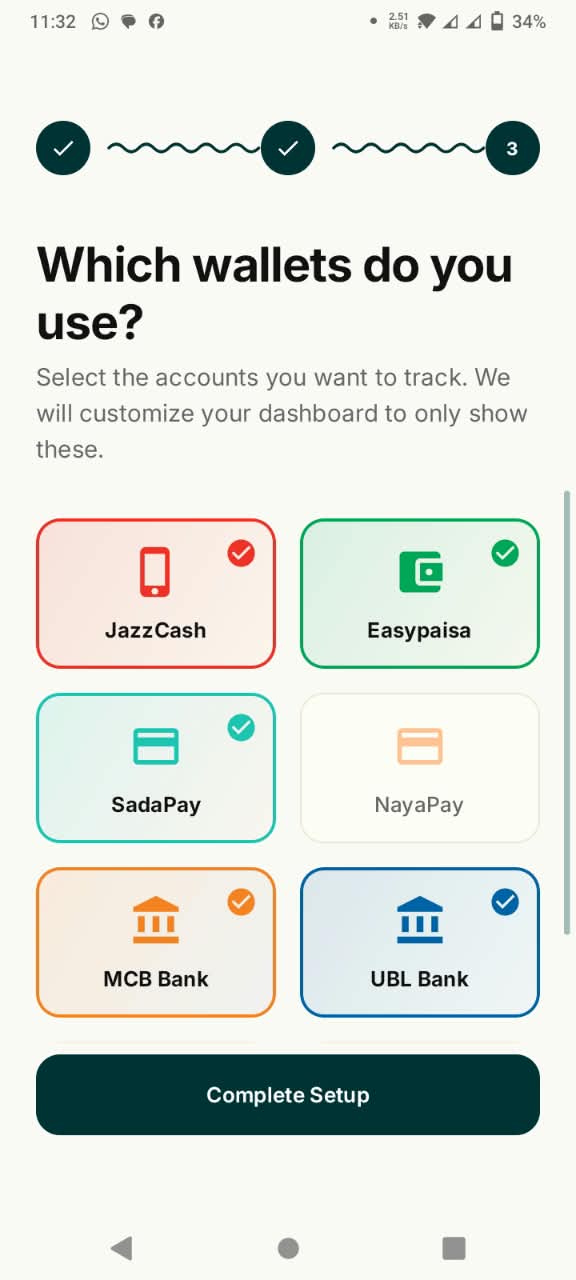
- Complete sign-in and select your wallet sources.
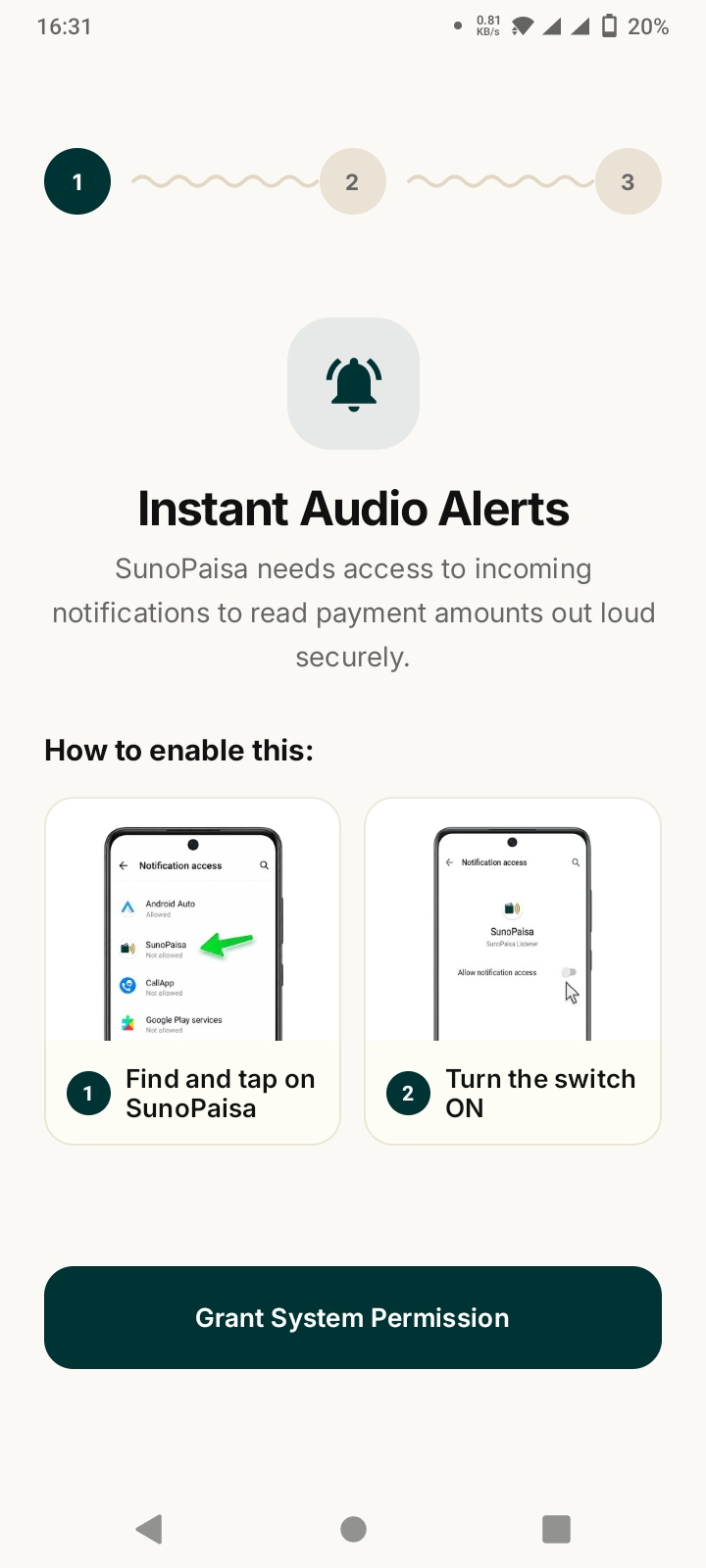
- Enable the app's Android Notification Access permission after reading its explanation.
- Confirm Easypaisa notifications are enabled in Android and the Easypaisa app.
- Check the sound setting and choose a voice configuration suited to your shop.
- Wait for a genuine supported incoming-payment notification.
- Check Hisaab for recognized activity and compare important payments with the official Easypaisa record.
Use the real merchant account for testing
An account used for receiving customers' money can generate notification messages different from casual transfers or promotional notifications. Don't judge compatibility by a notification that has nothing to do with a received payment. Use a legitimate test that matches your shop's real workflow.
Does Easypaisa need to send a notification?
Yes. The voice feature is based on notification information Android has received. If Easypaisa sends no compatible notification, or Android hides it from the app, SunoPaisa cannot invent a genuine receipt. Before troubleshooting SunoPaisa, confirm that the payment actually appears in the official Easypaisa account.
Can one app help with Easypaisa and JazzCash?
Many Pakistani shops accept more than one wallet. SunoPaisa is intended for supported notifications from selected wallets and banks, so the owner can review recognized activity in one daily Hisaab. This does not merge bank accounts or consolidate the underlying money.
If JazzCash is also part of your shop routine, follow the separate JazzCash notification guide.
What about free alerts and Business Mode?
You can start with 50 free spoken alerts per month. Business Mode unlocks unlimited supported voice announcements and additional merchant tools. Compare options on the Business Mode page before deciding. There is no need to subscribe just to learn whether the app is useful for your phone.
Common mistakes to avoid
Do not confuse an SMS about an offer with money received. Do not grant notification access to apps you do not trust. Do not share your Easypaisa PIN or OTP with a person offering to “activate” voice alerts. And do not assume silence proves that a customer has failed to pay.
Frequently asked questions
How do I make Easypaisa speak payments in Urdu?
Install SunoPaisa, enable notification access, select the compatible Easypaisa source and adjust the voice settings. Test the actual supported payment notification on your phone.
Is SunoPaisa the official Easypaisa application?
No. SunoPaisa is an independent Android notification utility made by VoxaGrid.
Is Easypaisa payment soundbox software free?
SunoPaisa includes 50 free spoken alerts each month. Optional Business Mode offers unlimited supported voice alerts.
Does it need my wallet password?
No. Notification announcements do not require sharing your Easypaisa password, PIN or OTP.
Can I keep my JazzCash and Easypaisa Hisaab together?
SunoPaisa can show recognized supported activity in its daily Hisaab. Verify discrepancies in the separate official wallet accounts.
Why is Easypaisa showing a notification but not speaking?
Check Android Notification Access, selected sources, media volume, free allowance, and background restrictions. Follow our troubleshooting steps.
Is the voice announcement equal to final payment confirmation?
No. Use the official Easypaisa transaction record when payment settlement matters.
Make your Easypaisa counter easier to manage
Try the real Android setup walkthrough and get SunoPaisa on Google Play. If your shop needs more alerts, see the current Business Mode plans.