
A shopkeeper does not want to stop serving customers every time somebody pays by phone. One customer asks for an easyload, the next wants a parcel, and a third sends money to a wallet. The phone vibrates, but the owner is busy. That everyday situation explains why people search for “payment bolnay wali app,” “paisa bolne wali app,” or “payment speaking app Pakistan.”
Quick answer: SunoPaisa is an Android payment voice-alert app for Pakistani shopkeepers. When the phone receives a compatible payment notification from a selected wallet or bank, SunoPaisa can announce the amount aloud. It also organizes recognized activity in a daily Hisaab. You can start with 50 free voice alerts per month.
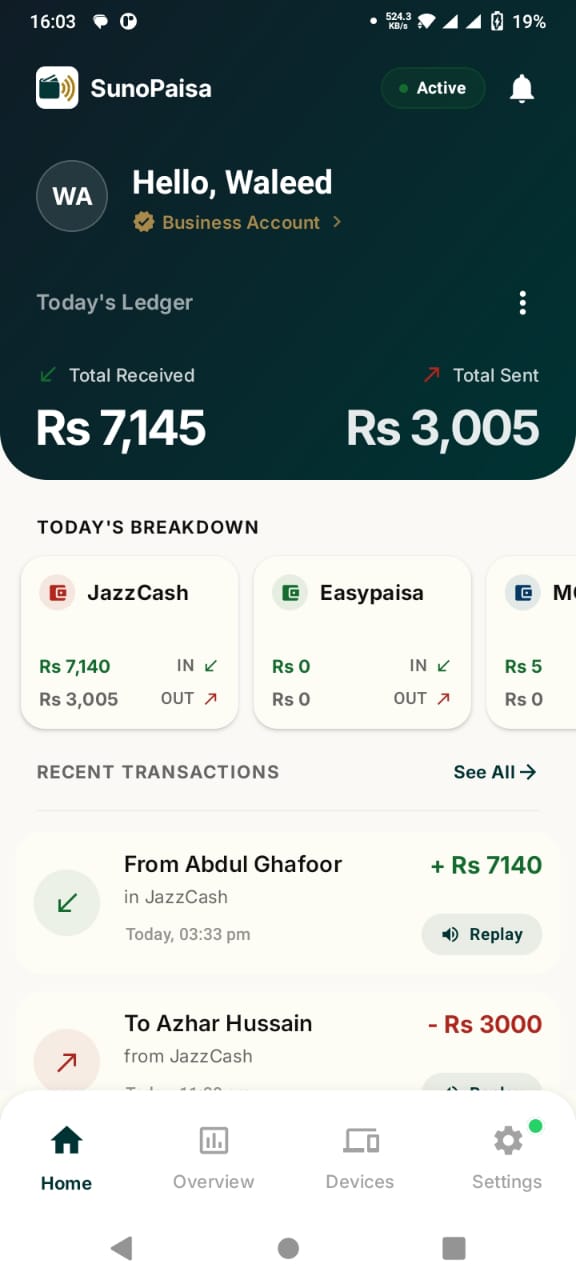
What does a payment bolnay wali app actually do?
Think of it as a voice assistant for incoming payment notifications. JazzCash, Easypaisa or a bank is still responsible for receiving money. SunoPaisa does not replace those services or ask the customer to send funds into a new account. Instead, it helps the shopkeeper hear supported notifications from services they already use.
For example, an incoming notification might say that Rs. 500 has been received. If the notification matches a supported format and Android delivers it with the necessary permission, SunoPaisa can speak the amount. The shopkeeper hears the alert while continuing to serve the counter.
An audible notification is convenient, but it is not an independent bank receipt. For important or disputed payments, open the official wallet or banking app and verify the actual transaction there.
Who is this useful for?
A kiryana store can have several small payments in a few minutes. A mobile accessories shop may receive money while the owner is packaging a phone cover. An easyload and mobile recharge retailer handles several conversations at once. At a food counter, staff may not have time to unlock their phone each time a notification arrives.
These are practical examples, not a promise that every bank or phone works identically. A good first step is to try SunoPaisa on the Android phone and wallets used at your own shop.
How do you start? Four easy steps
- Install SunoPaisa from its official Google Play listing. Avoid installing modified APK files received in random messages.
- Sign in with the account you will use for your shop.
- Grant the Android notification access that lets SunoPaisa read supported payment notifications. Read the permission explanation before accepting.
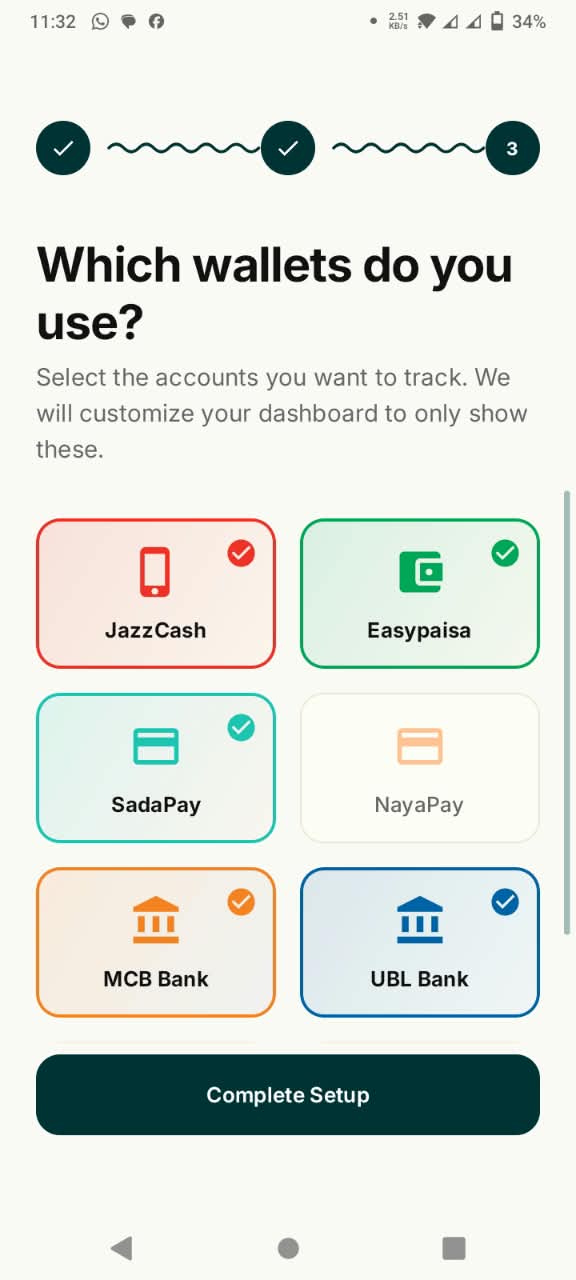
- Select the wallets or banks you use. Wait for a real compatible notification and check whether the spoken alert arrives.
The easiest way to understand the process is to follow the real three-screen setup guide, then see the payment demonstration on the homepage. The website demo is a simulation; your first actual wallet alert is the meaningful test.
Why a shopkeeper might prefer a phone-based soundbox
A traditional hardware soundbox is a separate counter device. A phone-based announcement app uses a compatible Android phone that the merchant may already own. That can be a simpler starting point for a small shop that wants alerts without choosing new hardware.
There are trade-offs. A physical soundbox may be bundled with a particular payment provider and designed for its QR network. SunoPaisa is designed around compatible notifications on Android, potentially across selected wallets and banks. The right choice depends on the shop's existing accounts, device, internet and the kind of alerts each service actually sends.
Read our detailed phone app versus hardware soundbox comparison before deciding.
What else does SunoPaisa give you?
- Daily Hisaab: Review supported recorded activity instead of relying only on memory.
- Multiple source selection: Choose compatible notifications from supported wallets and banks.
- Voice settings: Adjust voice announcements to suit your counter.
- A free starting point: Get 50 spoken alerts per month without first buying Business Mode.
- Business Mode: Unlock unlimited supported voice announcements and additional merchant features.
The app is designed to make a familiar shop routine easier. It is not a money-transfer service, and no app can guarantee a voice announcement when a payment provider sends no compatible notification.
What about English menus and Urdu announcements?
A shopkeeper does not need to understand technical terms such as “notification listener.” The simple idea is: install the app, enable the requested Android permission, choose a supported wallet, and listen when a compatible notification reaches the phone. The official website provides explanations in Urdu and English, and the app's voice capability is built around payment announcements understandable at a Pakistani counter.
Frequently asked questions
Is SunoPaisa a free payment speaking app?
Yes. SunoPaisa offers 50 free spoken alerts per month. Optional Business Mode plans are available for shops that need more announcements. See the current plans.
Does it support JazzCash payment voice alerts?
SunoPaisa can work with supported JazzCash notification formats received on a compatible Android phone. Check notification access, wallet selection and the actual incoming alert.
Can it also speak Easypaisa alerts?
Compatible Easypaisa payment notifications are among its supported sources. Recognition depends on the notification format and device. Read the Easypaisa setup guide.
Does a merchant need to buy a separate speaker?
Not for basic phone-based announcements. A compatible Android phone with audible sound can be enough to try the app. Shop requirements differ if staff need a separate counter setup.
Will it confirm the payment is genuine?
The app speaks supported notification information, not an independently verified settlement. Confirm important payments in the official bank or wallet account.
Why might the phone remain silent?
The wallet may not have sent a compatible notification, permissions may be disabled, the phone may restrict background activity, or the free voice quota may be finished. Use the seven-step troubleshooting guide.
Can an easyload seller use SunoPaisa?
If the retailer receives compatible payment notifications on a supported Android phone, the same announcement workflow can be useful. Read the easyload shop guide.
Try it at your own counter
Start with the free monthly voice alerts. Open your selected wallet, complete the setup and listen when a real compatible payment notification reaches the phone. If you need unlimited announcements, compare the current Business Mode plans. If you need help, contact the SunoPaisa team.